

















Website speed affects almost everything now. Conversions. SEO rankings. Customer trust. Even how long people stay on the site. Google continues prioritising page experience through Core Web Vitals, so slow stores don’t just frustrate shoppers. They also lose visibility in search results.
Mobile users feel it first. A customer browsing products during a commute or on slower mobile data isn’t going to wait six seconds for a product page to appear. They’ll leave and buy somewhere else instead.
Magento itself is a powerful platform. But without proper optimisation, performance issues build up over time. That’s why Magento Speed Optimization has become less of a technical task and more of a business priority.
8 Ways to Speed Up Magento 2 Store Performance
1. Upgrade to the Latest Magento Version
A lot of stores stay on older Magento versions longer than they should. Usually, because updates feel inconvenient or risky. But outdated versions often create performance bottlenecks quietly in the background.
Newer Magento releases include speed improvements, security patches, and better optimisation features that genuinely help speed up Magento 2 stores. Leaving the platform outdated eventually creates bigger issues later anyway.
2. Use Proper Caching With Redis and Varnish
Caching makes a massive difference to Magento Performance Optimization. Without it, the server keeps rebuilding pages repeatedly for every visitor, which slows everything down.
Redis helps manage sessions and backend caching more efficiently. Varnish focuses more on frontend page delivery speed. Most larger Magento stores benefit from using both together rather than choosing one over the other.
3. Optimise Product Images
Large image files are one of the biggest reasons Magento stores slow down. High-quality visuals matter for ecommerce, but oversized files create problems quickly, especially for mobile users.
Compressing images properly, switching to formats like WebP, and using responsive image sizing can improve load times significantly without hurting image quality. This becomes especially important for Australian shoppers browsing on mobile networks outside major metro areas.
4. Remove Unnecessary Magento Extensions
Magento extensions are useful until there are too many of them. Every plugin adds scripts, database activity, or processing overhead. Some extensions are poorly built and slow stores down far more than people realise.
It’s worth auditing extensions regularly and removing anything unnecessary. A cleaner Magento setup almost always performs better.
5. Upgrade Hosting and Use a CDN
Magento is resource-heavy by nature. Cheap shared hosting usually struggles once traffic starts increasing. Pages slow down, server response times increase, and checkout performance suffers.
Cloud Hosting or Dedicated Magento Hosting environments handle traffic much more reliably. Using a CDN also helps distribute content faster across Australian regions, whether customers are browsing from Sydney, Melbourne, Perth, or elsewhere.
6. Enable Lazy Loading and File Minification
Not everything needs to load immediately when a customer opens a page. Lazy loading delays images and certain content until users actually scroll to them. That improves initial load speed noticeably. Minifying CSS, JavaScript, and HTML files also helps reduce unnecessary file weight. Small optimisations like these add up quickly.
7. Optimise Magento Database Performance
Magento databases get messy over time. Old logs, unused tables, abandoned data, and unoptimised queries gradually slow both frontend performance and admin panel responsiveness.
Database cleanup and indexing improvements often make stores feel noticeably faster without changing anything visually. This part gets overlooked surprisingly often.
8. Monitor Performance Regularly
Speed optimisation isn’t something you do once and forget about. Stores change constantly. New products, plugins, design updates, and marketing scripts. Performance shifts with them.
Tools like Google PageSpeed Insights or GTmetrix help identify issues early before they start affecting customers. Keeping an eye on Core Web Vitals also helps spot where the store is slowing down over time.
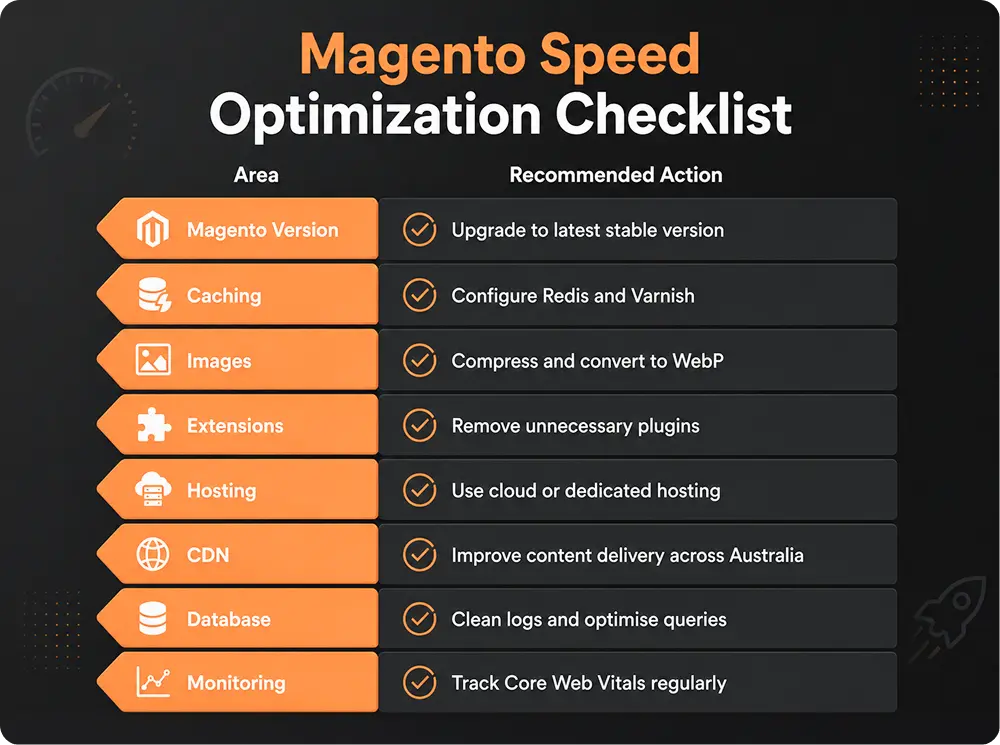
Magento Speed Optimization Checklist for Australian Stores
Should You Hire a Magento Speed Optimization Service?
That’s where a Magento Speed Optimization Service becomes useful. A proper audit can identify issues that most store owners never notice themselves. And in ecommerce, even small speed improvements can directly impact revenue.
🎧 Why Magento Store Speed Matters More Than Ever in 2026

Magento stores don’t suddenly become slow overnight. Performance issues usually build over time through outdated versions, heavy extensions, poor hosting, and unoptimized images. In this episode, we break down the biggest reasons Magento 2 stores struggle with speed as traffic grows.
We also cover the practical fixes that improve store performance, including Redis and Varnish caching, CDN setup, database optimization, lazy loading, and upgrading to better hosting environments for Australian ecommerce businesses.
If your store is losing conversions, struggling with Core Web Vitals, or creating a poor mobile experience, this episode explains how Magento Speed Optimization directly impacts customer experience, SEO rankings, and long-term ecommerce growth.
 Press play and listen.
Stop Losing Sales to a Slow Magento Store

A Magento store slow enough to frustrate customers rarely stays profitable for long. The tricky part is that performance issues build gradually. Businesses often don’t notice the impact until conversions start dropping. Faster stores create better shopping experiences, stronger SEO performance, and fewer lost sales over time.
Frequently Asked Questions (FAQs)
Why is my Magento 2 store so slow?
Common reasons include outdated Magento versions, poor hosting, too many extensions, large image files, and missing caching configuration.
How do I improve Magento 2 page load speed?
Use caching, optimise images, reduce unnecessary scripts, upgrade hosting, and monitor performance regularly.
What is the best caching solution for Magento 2 (Redis vs Varnish)?
Redis works well for backend caching and sessions, while Varnish improves frontend page delivery. Most Magento stores benefit from using both together.
How do I optimise Magento images for Australian shoppers?
Compress image files, use WebP format, and enable responsive image sizing for mobile users.
Does upgrading to the latest Magento version improve speed?
Yes. Newer Magento versions include performance improvements, security updates, and backend optimisation features.


Solution Architect - Digital Commerce
Over 13 years, I've delved deep into technology, E-Commerce, Web applications and cloud architecture, crafting a journey defined by innovation and adaptability. My focus on E-commerce has given me insights into digital markets and consumer behaviour, while my expertise in coding and cloud architecture has allowed me to build strong, flexible infrastructures vital for successful online businesses. Each year has been a new chapter, refining my skills in creating cloud solutions that perfectly suit ecommerce needs. I make it a priority to stay updated on the latest tech, ensuring my strategies drive innovation and empower businesses in the ever-changing digital world.