Running an old Magento version? You’re throwing your business away.
Magento 1 supported back in June 2020 lost support. Nearly five years without security patches. If you’re running an old version of Magento 2 software, guess what-there’s a similar issue, you’re cutting yourself short of the updates that help keep things secure and functional.
Australian online retailers do not have it easy. Shoppers expect lightning fast pages, faultless mobile browsing and without frustrating checkout. Outdated platforms can’t deliver such an experience.
This blog contains information on the actual process of migrating your magento store 2026. No fluff, just real information about costs, timelines, what breaks and how to prevent it. Finding a solid magento development company early saves you months of headaches.
The Hidden Cost of Delay
Running old software costs you more than you’d think.
Security holes accumulate. Hackers love old platforms as they are easy to hack. One successful breach costs you customers, revenue and your reputation.
Site speed suffers badly. Last year’s research showed 53% of mobile shoppers abandon sites taking over three seconds to load. That’s actual lost money.
Australian privacy regulations don’t mess around either. Your customers understand their rights and expect proper protection. Outdated software puts you at risk legally and reputationally.
Understanding Migration Types
Where you start determines your path forward.
Magento 1 to Magento 2
This isn’t upgrading, it’s rebuilding everything. The platforms operate so differently that extensions won’t transfer over. Custom code needs complete rewrites. It’s pricey and slow, but continuing with Magento 1 is genuinely dangerous now.
The benefits are substantial though. Magento 2 performs faster, handles mobile users better, and receives proper security maintenance. You get features that match how people actually shop today.
Staying Within Magento 2
Already running Magento 2 but outdated? This hurts less. Most customisations adapt without full rewrites. You still gain crucial security patches and new functionality, just without demolishing everything first.
Adobe Commerce Option
Adobe bought Magento years ago and rebranded the enterprise product as Adobe Commerce. It is directed at larger operations requiring cloud infrastructure, powerful analytics, and support for a given operation. The Iconic operates on Adobe Commerce to manage their enormous traffic volumes. That’s what it’s designed to handle.
Planning Your Strategy
Your current setup shapes how migration unfolds.
Begin with a thorough audit. Document every extension, each customisation, all integrations. Sounds boring but you’ll uncover forgotten elements. This documentation becomes your roadmap.
Set specific goals. “Better performance” means nothing measurable. “Mobile page loads under two seconds” gives you a clear target. Same applies to security, features, whatever drives your decision.
Budget realistically then add padding. Magento 2 migration requires serious investment. Development hours, testing periods, possible revenue loss during transition, it accumulates quickly.
Something unexpected always happens. Quality developers cost more upfront but prevent disasters that cost exponentially more.
The Migration Process
Here’s how most migrations actually happen.
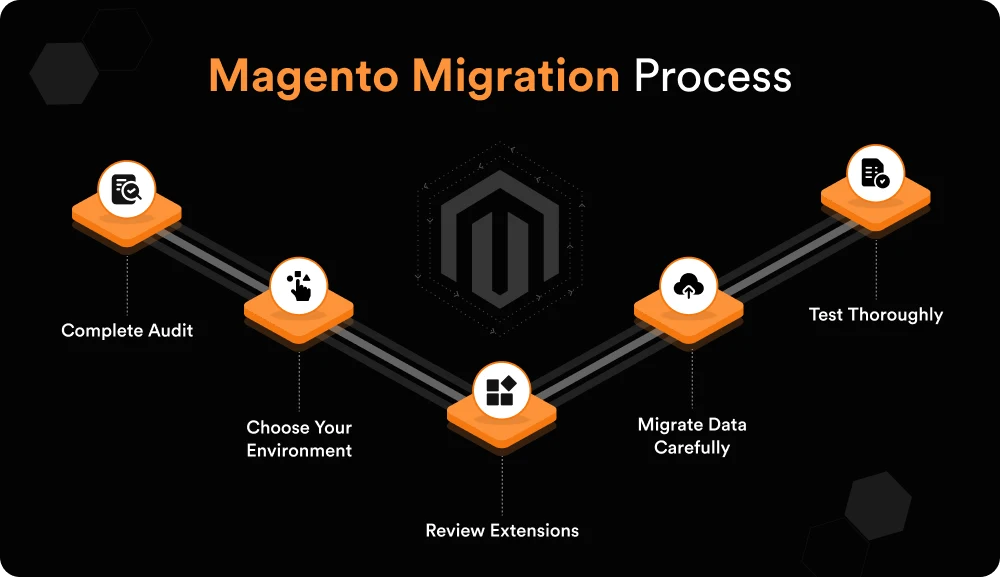
1. Complete Audit
Examine everything in your current store. Document each customisation. List all extensions. Map payment systems, shipping integrations, marketing connections, record it all. This becomes your blueprint. Without it, you’re flying blind.
2. Choose Your Environment
Self hosted magento opensource or Adobe Commerce Cloud? Cloud hosting costs are higher on a monthly basis but scale up automatically if there is a rise in traffic. Consider surf retailers before summer, they get slammed. Cloud infrastructure handles that surge without intervention. Smaller operations might not need that capability.
3. Review Extensions
Not everything should migrate forward. Some extensions are obsolete. Others have superior modern alternatives. Bunnings Trade operates with streamlined systems that integrate seamlessly. That’s your target approach.
4. Migrate Data Carefully
Products, customers, orders, everything moves. Automated tools assist but manual checks catch what automation overlooks. One incorrect price or missing order history generates immediate customer complaints.
5. Test Thoroughly
Test everything pre-launch. Product pages, checkout flow, payment processing, mobile rendering. Load testing matters significantly. Click Frenzy reveals whether your platform handles actual traffic volume. Discovering issues during testing beats finding them during sales.
Common Issues
Even careful planning encounters problems. Here’s what typically occurs.
- Data corruption happens. Back up everything first. Thoroughly test migrated data. Early error detection beats post-launch fixes.
- Custom code fails. Magento 1 code won’t execute on Magento 2. Allocate proper time for correct rebuilds. Rushing creates persistent bugs.
- SEO rankings fall. Maintain URL structures wherever feasible. Configure 301 redirects for necessary URL changes. Your organic traffic took years developing, protect it.
- Downtime reduces sales. Schedule migration during slowest periods. Communicate clearly with customers about timing. People appreciate transparency.
- Extensions vanish. Not every extension has Magento 2 equivalents. Identify alternatives before starting migration. Properly testing new tools requires time.
Version Comparison for 2026
Different scales require different solutions. Here’s what each option delivers for Australian retailers.
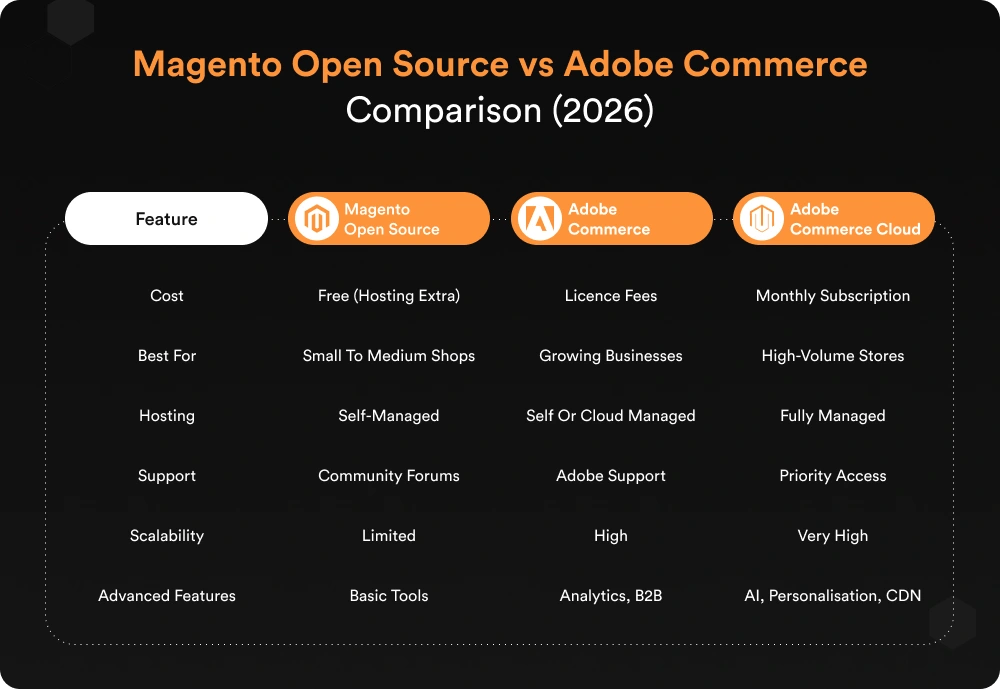
Most Australian SMBs begin with Open Source. Growth pushes businesses toward Adobe Commerce eventually. Kogan leverages Adobe Commerce Cloud for peak periods. That’s the infrastructure level it provides.
Developer Selection Importance
Migration isn’t DIY territory. Magento web development in Sydney requires specialist expertise. Your developer choice determines success or failure.
Request case studies from comparable businesses. Actually verify references, don’t skip this. Good partners communicate clearly and set achievable timelines. Poor ones overpromise and underdeliver consistently.
Post-Launch Phase
Launch starts optimisation, not ends it.
Performance tuning continues indefinitely. Monitor load times constantly. Optimise images, configure caching properly, adjust server settings. Small improvements compound significantly.
Ongoing maintenance keeps everything functional. Security patches release regularly, install them. Feature updates add capabilities. Stay current or fall behind again.
Act Now
Delaying makes migration harder and costlier. Australian eCommerce intensifies yearly. Your platform either keeps pace or actively restricts you.
Outdated technology drains money daily through lost sales, security vulnerabilities, and customer frustration. Working with experienced magento web development in Sydney ensures a successful migration.
🎙️ Magento 1 to Magento 2 Migration for Australian Stores

Still running an outdated Magento version? Learn why delaying migration impacts security, SEO, and sales — especially for Australian eCommerce brands.
Listen to this podcast before you lose customers.
Ready to Modernise

VT Digital has completed Magento migrations for Australian SMBs and enterprises. We understand local requirements and deliver results reliably. Book your free migration consultation to learn exactly what your upgrade entails, what it costs, and the timeline involved.
Frequently Asked Questions (FAQs)
Audit your existing store very well, decide your target platform, plan a data migration carefully, hire experienced developers. Testing the complete pre-launch prevents expensive post-launch mistakes.
Audit in full, pick environment, migration data, rebuild customisations, test extensively, and post-launch monitoring. Each step is important, and skipping or rushing any step can lead to problems arising at a later stage.
Small to medium stores typically run Magento Open Source. Growing enterprises gain from Adobe Commerce features. High-volume retailers require Adobe Commerce Cloud’s scalability and advanced capabilities.
Data loss, broken customisations, SEO ranking drops, downtime, extension compatibility, these surface most frequently. Proper planning and experienced support help avoid most problems entirely.